![logo icon white.png]](https://help.hijiffy.com/hs-fs/hubfs/logo%20icon%20white.png?width=50&height=50&name=logo%20icon%20white.png)
Why Does This Matter?
The problem: Many users start the booking process but leave without completing it. Maybe they got distracted, wanted to compare prices, or just needed more time to decide.
The solution: Hijiffy requests the phone number and GDPR consent during the booking flow and lets you follow up. This means you can recover bookings you'd otherwise lose.
How It Works (In 4 Simple Steps)
Step 1: User shows intent to book a room
User shows intent to book a room by clicking on a book a room button (that contains the booking form/flow) or by typing the intention
Step 2: User is Asked 2 additional simple questions
During booking, user inserts booking details and is asked 2 additional question:
- Phone number
- GDPR consent
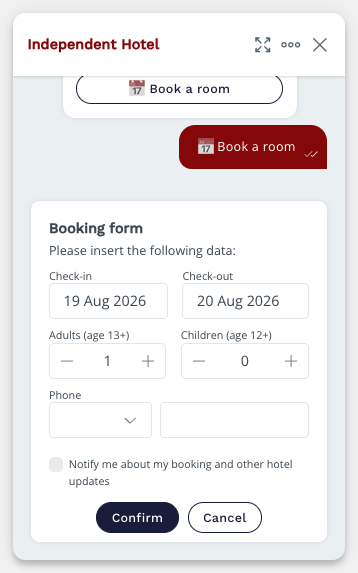
These are optional - users can skip them if they want.
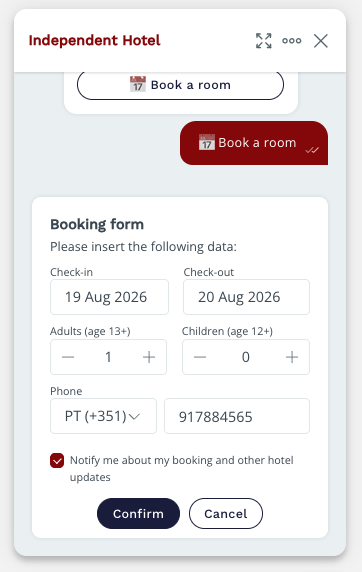
Step 3: User does finish the flow
If the user finishes the flow but doesn't complete the booking within 2 hours (booking pixel does not fire on booking engine confirmation page), HiJiffy captures them as a lead qualified (if phone number is inserted and GDPR consent is given).
Step 4: You Send a Reminder
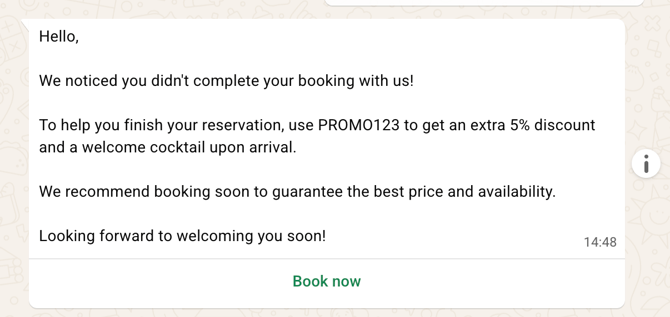
You can now send that guest an automated WhatsApp message saying something like:
"Hi! We noticed you were interested in booking with us. Complete your reservation here by clicking on the button below and using the PROMO123”
You configure this message through your Hijiffy Campaigns Manager and we send automatically to leads qualified - no manual work needed.
What do you see on the HiJiffy Console?
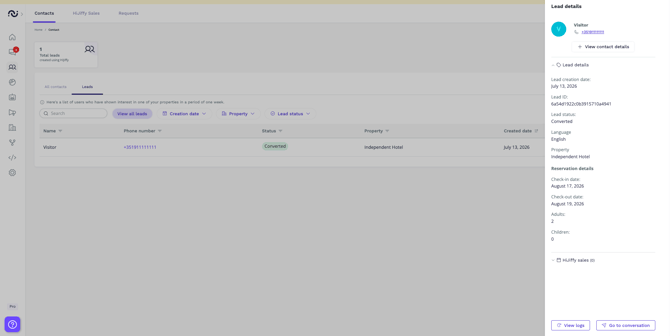
In your Hijiffy console, you'll find a new Leads section that shows:
- Guest name & phone number
- Which reservations details were inserted
- Lead status (qualified, reached and converted)
You can see exactly who abandoned their booking and gave GDPR consent and phone number details and track if your reminders worked.
How to:
Access guest manager > Contacts > Leads
Who Can Use This?
This feature is automatically available if you:
- Have WhatsApp pre-stay set up on your account
- Have a booking flow chatbot configured
- Have at least one WhatsApp number connected
No extra setup needed - it just works.
Privacy & Guest Trust
We take privacy seriously:
- Users choose whether to share their phone number
- Guests opt-in to WhatsApp notifications
- We are fully GDPR compliant
Quick Tips for Success
Key: We strongly recommend to create a specific promo code on your side for your feature and add it to the whatsapp automated campaign, to track the success of it (we are able to track bookings that are made from the same device the whatsapp campaign was sent to).
- Keep it friendly. Your WhatsApp reminder should feel personal, not pushy.
- Act fast. Send reminders within a few hours of abandonment - while they're still thinking about you.
- Make it easy. Include a direct link as a button to complete the booking with one click.
- Track results. Check your booking recovery report on the reports section to see how many bookings were recovered, as well as amount and recovery rate, conversion flow, leads captured, details of leads, which campaigns work best and messages sent.
Important notes:
- Leads are created per property (one user can have multiple leads)
- Leads expire after 7 days if they don’t convert and will disappear from leads table (information is available on booking recovery report as “expired”)
- To create a campaign for this feature you must select the category “booking recovery” on step 1 (recurring campaigns)
FAQs
Why didn't I see the phone number and GDPR fields on my booking form?
These fields are only visible if the feature is active on your account. If you can’t see it, please contact our support team for assistance.
Can I see which guests made actual bookings?
Yes! This information is present in 2 areas of the console:
- Leads table: Access guest manager menu, contacts, leads. Filter leads table by status converted and click on top of the lead. On the right side you can see the hijiffy sales
- Booking Recovery Report: Access reports menu, booking recovery tab. On the first section, if any recovery bookings were made, the information is displayed on the table just below.
Next Steps
- Check your console for the new Leads section
- Create your first recovery campaign in Campaigns Manager
- Start recovering those bookings! 🎉