![logo icon white.png]](https://help.hijiffy.com/hs-fs/hubfs/logo%20icon%20white.png?width=50&height=50&name=logo%20icon%20white.png)
A dedicated report with Email Copilot metrics is available under Reports, in a new tab called Email Copilot. At the top, you can filter the report by time period and by channel. The report is organized into the following sections:
Insights & metrics
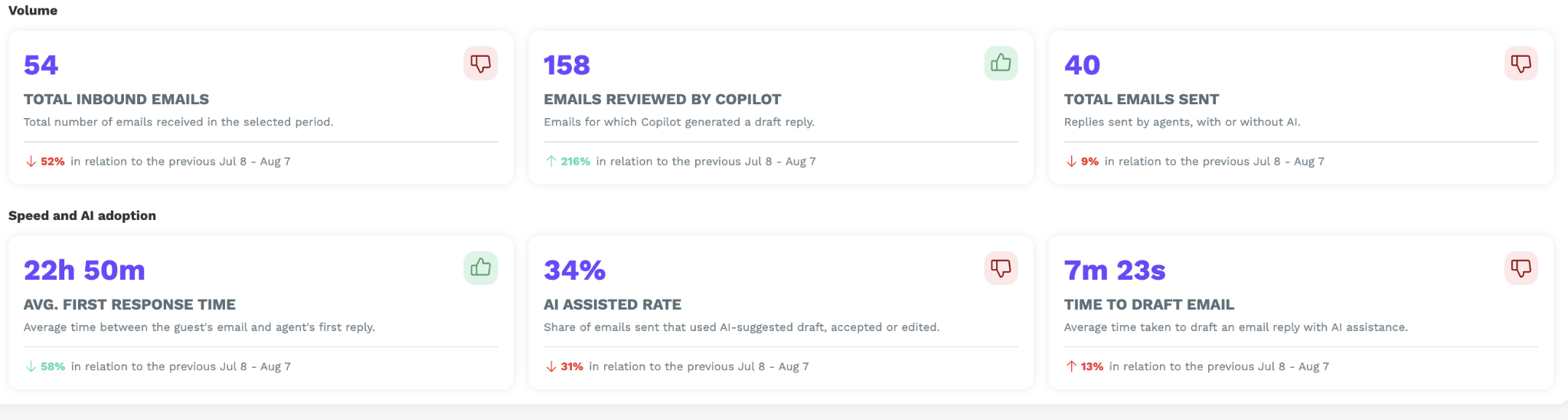
Real-time analytics on Email Copilot performance: response times, resolution efficiency, and AI assistance across your email conversations.
This section groups metrics into three areas - Volume, Speed, and AI Adoption. Each card includes a short description of the metric and a comparison against the previous period.
Templates usage
Most used email templates and their acceptance rate.
This section lists the templates Copilot uses most often when generating replies - how many times each template was used, and how agents responded to the replies built from them (accepted vs. edited).
Note: A single reply can draw on more than one template, so the counts in this section won't necessarily add up to the total number of replies generated.
Missing info & unanswered questions
Similar to the existing Aplysia 3 report, this section lists the questions Email Copilot wasn't able to answer (tagged accordingly) — surfacing gaps in the Knowledge Base so they can be closed.
For each one, you'll see:
- Property context and date
- A link to open the conversation
- A link to open the related Knowledge Base document
- An option to mark it as resolved
Email handling timeline — AI-assisted vs manual
Comparison of AI-assisted vs manual email handling flow.
This section compares how long it takes to draft a reply with Email Copilot against drafting one manually, so the time saved per email is clear.
It breaks down into:
- Time to draft when accepting an AI suggestion
- Time to draft a reply manually
- Time saved per email
Adoption & usage
AI suggestion acceptance, editing, and rejection breakdown.
From this section through to the end of the report, you can filter by agent - narrow the view down to one agent, or keep it at team level.
This section shows charts on adoption and usage: how many replies were accepted, edited, or rejected.
Team metrics
This section shows detailed per-agent metrics: emails sent, average first-reply time, and acceptance rate of Copilot's suggested replies.
View the full table across all agents, or filter to one agent for their individual detail.