![logo icon white.png]](https://help.hijiffy.com/hs-fs/hubfs/logo%20icon%20white.png?width=50&height=50&name=logo%20icon%20white.png)
How it works
- A new email arrives in an enabled email channel and Email Copilot starts generating a suggestion automatically, unless the sender matches an exclusion rule.
- The Template Agent identifies the Answer Template(s) that best match the guest's intent.
- The Search Agent searches the relevant Knowledge Base sources, and the Draft Agent combines those facts with the selected template structure.
- When the agent opens the thread, the suggestion appears at the top. Generation can take up to 30 seconds, with an animation shown while the draft is being prepared.
- Depending on the information available in the Knowledge Base and whether human input is required, Email Copilot produces either a complete suggestion or a draft with visible tags [human agent: …] showing what the agent needs to complete or confirm.
For Partial or No-Answer suggestions, the Send button stays disabled until all tags are resolved. - The agent reviews the suggestion, edits it if needed and sends it — or ignores it and writes their own reply. Nothing is sent automatically.
What you need to set up
Pre-requisites
- Aplysia 3 chatbot
- Email account set up in the console
Setup requirements
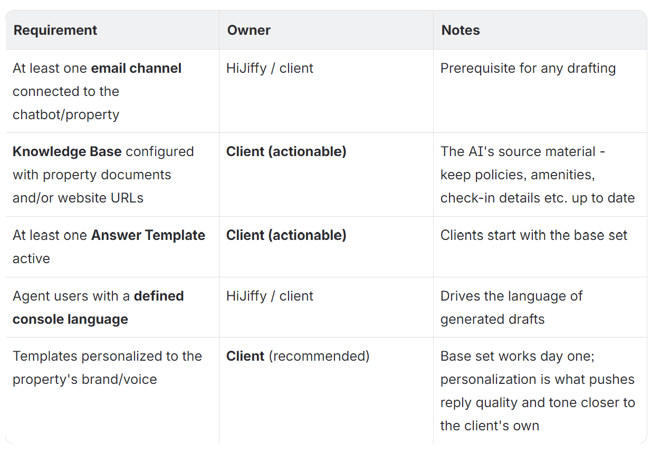
Activation Flow
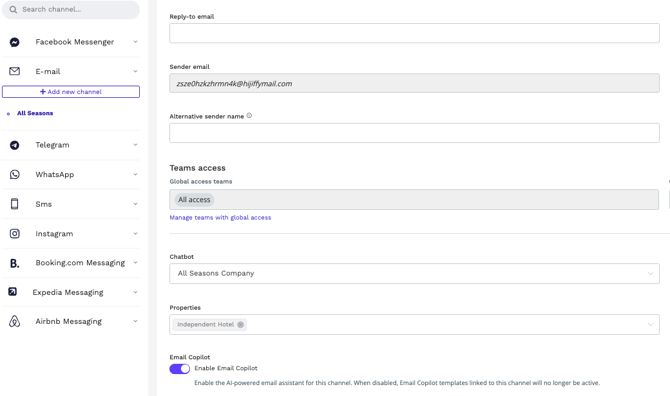
This is done in two steps:
- Feature is enabled by HiJiffy.
- You need to enable the feature in the email channel where they want to use Email Copilot
What changes in the inbox when the feature is enabled:
- AI-generated suggestion at the top of every opened email thread
- Generation animation while the draft is prepared (up to 30 s)
- Insights panel (templates used, sources, context)
- Translation tools promoted into a dedicated button (out of Power Tools)
- Send disabled for Partial / No-Answer suggestions until human tags are filled
- Label-based filtering on sent emails (Generated by AI, Generated with the help of AI)
- A new Email AI Templates management area in the admin console
Permissions
Management of Email Copilot templates and settings is restricted to Admin and Manager roles. This keeps the "instructions" given to the AI consistent with the hotel's official policies and brand voice.
Additional capabilities:
- Thread summaries: Agents can summarise long or complex email threads on demand, helping them catch up quickly during handovers or ongoing conversations.
- Reporting: A dedicated Email Copilot report tracks usage, speed, AI adoption, template performance, Knowledge Base gaps, drafting time saved and agent-level performance.
- Personalisation: Email Copilot addresses the guest by name and lets agents adjust tone before sending. If a signature is set for the agent or the channel, Copilot uses it; if not, the signature comes from the template. Greetings are set inside each template.
Even though the Email Co-Pilot feature is available for clients with both Pro and Premium subscriptions, it has additional costs. If you have interest in this feature, please contact your Sales Representative or your Customer Success Manager.